
Apps / Buzzcord
Buzzcord
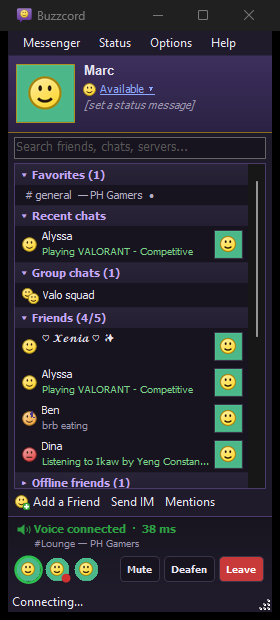
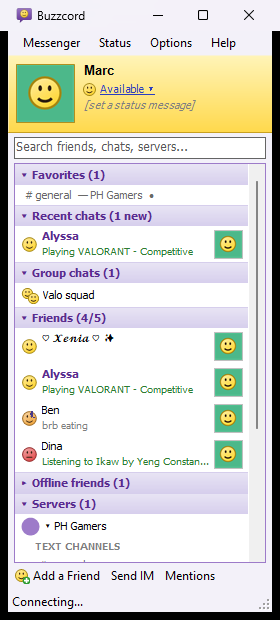
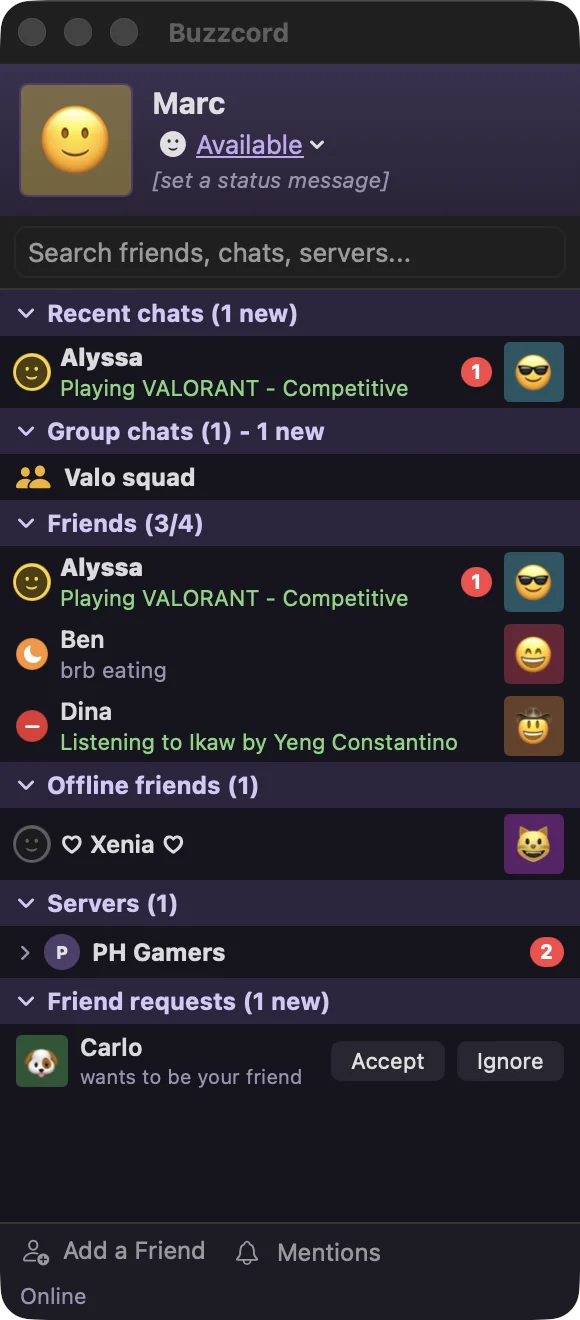
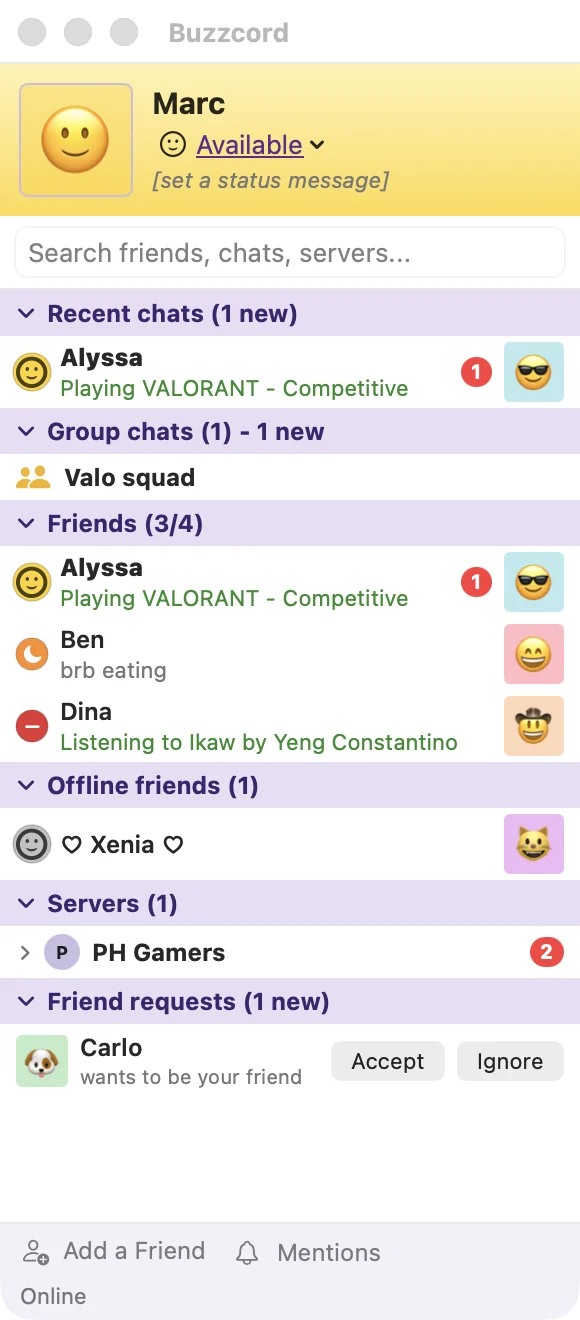
A lightweight, old-school messenger for Discord. The buddy list, IM windows, BUZZ! and smileys of the classic messengers, with native Windows and Mac controls instead of a heavy browser app. Several accounts at once, and your game shows on all of them.
Remember when chatting looked like this?
All the Discord you use, none of the weight
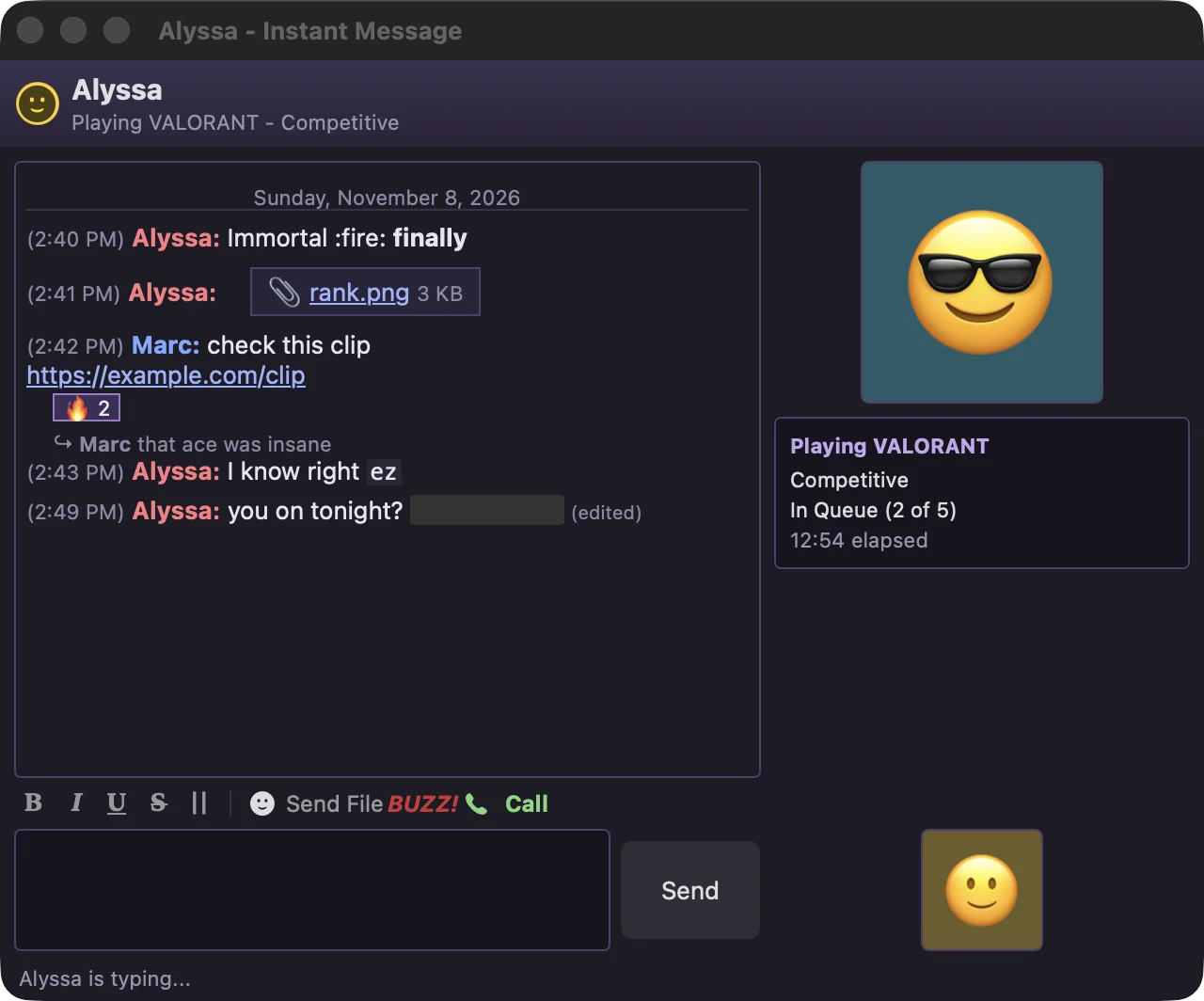
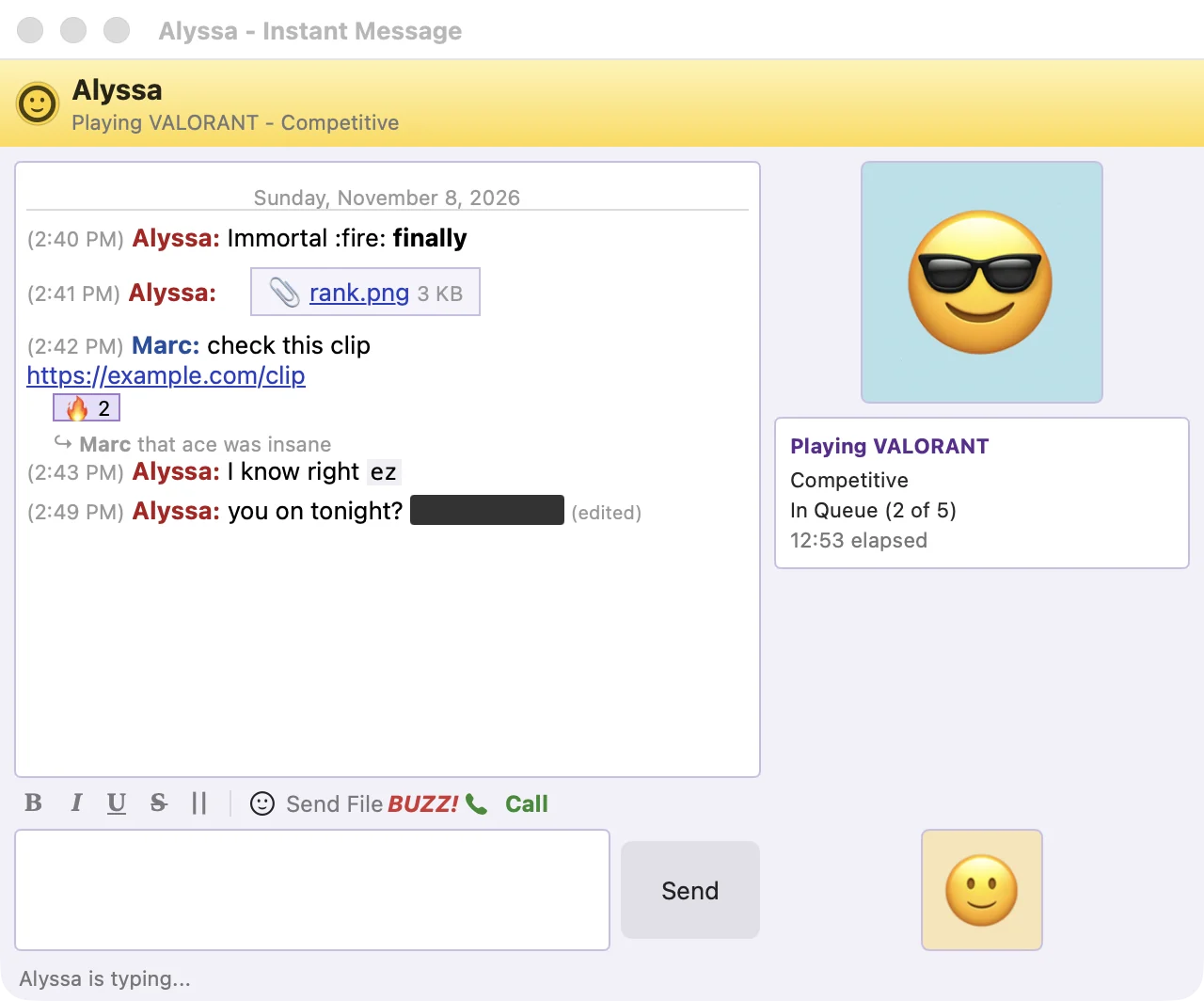
Buddy list and IM windows
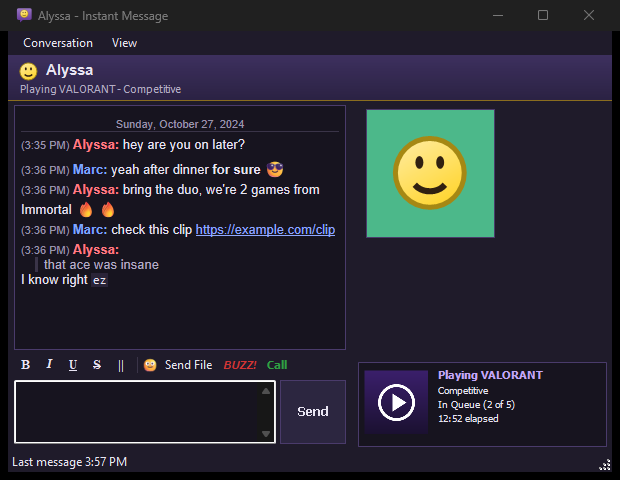
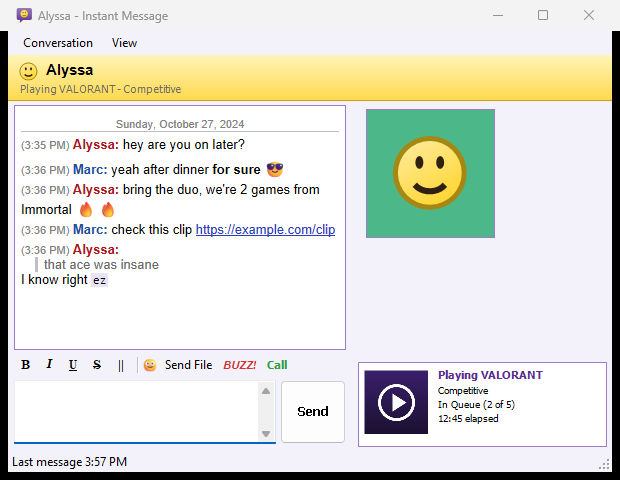
Favorites, recent chats, group chats, friends (online first, with what they're playing) and servers in one small window. Every conversation opens in its own IM window. Right-click someone to block them, and unblock them from the Blocked Users list.
Several accounts at once
Sign in to as many Discord accounts as you like, each with its own buddy list. Games' rich presence goes out on every one of them.
Pictures, videos and files
Pictures, GIFs and videos play right in the chat. Paste or drop pictures, GIFs, videos and files to send them, up to Discord's limit for your account and server. Files people send you in DMs are saved to a folder for you.
Voice calls
Call friends and groups, and join server voice channels, with Discord's end-to-end encryption. Push-to-talk works while you game.
Quiet while you game
On Windows, no pop-ups or sounds while a game runs, just a small note by the clock. Away by itself when you step away, and mentions, friend sign-ins and unfriend alerts are kept in a history.
BUZZ! and smileys
Shake a friend's window, pick from the color smiley menu, react to messages, and switch between the classic light look and dark mode.
Get Buzzcord for your computer
Please read first
Buzzcord is an unofficial Discord client. It isn't made, endorsed or supported by Discord Inc. Discord's Terms of Service don't allow third-party clients on user accounts, so even though Buzzcord behaves like Discord's own web app and never automates anything, Discord could limit or ban accounts that use it. Use it at your own risk.
Windows
Windows 10 and 11, 64-bit. Nothing to install: unzip it and run Buzzcord.exe.
Download for WindowsVersion 1.5.0 · about 953 KB zip · updates itself · not code-signed yet
Mac
macOS 14 Sonoma or later, Apple silicon and Intel. Unzip it and drag Buzzcord into Applications.
Download for MacVersion 1.5.0 · 3.4 MB zip · updates itself · not notarized yet
Source code
Every line is on GitHub under the MIT License, along with the release notes and each zip's SHA-256 checksum.
View on GitHubSet up on Windows in a minute
- Unzip the download somewhere you'll keep it, like Documents\Buzzcord, and run Buzzcord.exe.
- Buzzcord isn't code-signed yet, so the first time Windows says it protected your PC: choose More info, then Run anyway. If Smart App Control is on, Windows blocks unsigned apps entirely; wait for a signed release.
- Sign in with the QR code: Discord on your phone › your profile picture › Scan QR Code.
- For rich presence, quit the official Discord app so games find Buzzcord instead.
Set up on a Mac in a minute
- Unzip the download and drag Buzzcord into your Applications folder, then open it.
- The first time, macOS says it cannot verify the app. Choose Done, open System Settings › Privacy & Security and choose Open Anyway. Only once.
- Sign in with the QR code: Discord on your phone › your profile picture › Scan QR Code.
- For rich presence, quit the official Discord app and turn on Options › Show What I'm Playing.
Your account stays yours
Buzzcord signs in with Discord's QR code and never asks for your password. Your sign-in stays on your computer: encrypted for your Windows user, or in your Mac’s keychain. Never paste a token or “login code” someone sends you: that's how accounts get stolen.
It connects only to Discord and the services Discord's own app uses, plus GitHub to check for updates. No analytics, no ads, and nothing is sent to me. Game detection only reads process names, so it's safe next to anti-cheats. Privacy details
Details
- Version1.5.0 for Windows and Mac
- Windows10 and 11, 64-bit
- MacmacOS 14 or later, Apple silicon and Intel
- DownloadAbout 925 KB (Windows), 3.2 MB (Mac)
- Runs asTray app (Windows), menu bar and Dock (Mac)
- LicenseMIT, open source
- PriceFree, tips welcome
Buy me a coffee
Buzzcord is free, with no ads and no tracking, and it'll stay that way. If it brought a bit of the old messenger magic back to your desktop, a small tip keeps it going and helps pay for code-signing certificates, so Windows and macOS stop warning about it.
Questions about Buzzcord
Is Buzzcord allowed by Discord?
No. Discord's Terms of Service don't allow third-party clients on user accounts. Buzzcord acts like Discord's own web app and never automates anything, but Discord could still limit or ban an account that uses it. It's your choice, at your own risk.
Is it safe? Will it steal my account?
Buzzcord never asks for your password: you sign in by scanning a QR code with Discord on your phone. Your sign-in is encrypted and stays on your computer, and Buzzcord only talks to Discord. The code is open for anyone to read on GitHub. Only download it from this page or GitHub, and check the SHA-256 listed with each release.
Can I use two Discord accounts at the same time?
Yes. Add more accounts from the tray icon’s menu on Windows, or the menu bar icon on a Mac. Each gets its own buddy list window, and a game's rich presence shows on all of them.
Why isn't my game showing on Discord?
Quit the official Discord app so games talk to Buzzcord instead, and check Help › Rich presence status. In Discord, User Settings › Activity Privacy › Share your detected activities with others must be on; Buzzcord warns you in red when Discord is hiding your game.
Does it have voice calls?
Yes, voice only: calls with friends and groups, and server voice channels, with Discord's end-to-end encryption. There's no video or screen share. The Mac version cancels echo; on Windows there's no echo cancellation yet, so use headphones.
Does Buzzcord update itself?
Yes, from version 1.3, on Windows and Mac. It checks GitHub for a new release when it starts and every 6 hours, downloads it in the background, checks it against the release’s published checksum, and installs it when you restart. Turn it off under Options › Update Buzzcord automatically. If you have 1.2, download the latest version once by hand. On a Mac, keep Buzzcord in your Applications folder so it can replace itself.
Is there a Mac version?
Yes. Buzzcord for Mac runs on macOS 14 Sonoma or later, on Apple silicon and Intel Macs: download it above. It’s a native Mac app with the same buddy list, IM windows, voice calls and rich presence, plus a menu bar icon. It isn’t notarized yet, so open it once with Open Anyway in System Settings › Privacy & Security.
Release notes
- 1.5.010 November 2026
Windows and Mac: attached files show above the message box with a thumbnail, size and remove button. Buzzcord knows Discord's upload limits (20 MB without Nitro, 50 MB with Nitro Basic, 1 GB with Nitro, more in boosted servers) and says so before sending a file that's too big. Pasted GIFs stay animated. Mentions & notifications now read like a chat, newest at the bottom. Installs itself over 1.3.0 and later.
- 1.4.09 November 2026
Windows and Mac: block someone from the right-click menu or their profile, and unblock them from Messenger > Blocked Users. A blocked person's messages in servers and group chats are folded away (one click shows them) and don't count as new. Remove from Recent closes a chat in Recent chats, like the X in Discord. Installs itself over 1.3.0 and later.
- 1.3.39 November 2026
Windows: Accept, Ignore and Cancel on friend requests always respond, even on a request half off the bottom of the list, and if one fails Buzzcord says why. Windows and Mac: updates now find the newest version for your computer even when the newest release is for the other one, and every release now carries both downloads. Installs itself over 1.3.0 and later.
- 1.3.29 November 2026
Mac: Accept, Ignore and Cancel on friend requests work again, and if one fails Buzzcord says why.
- 1.3.18 November 2026
Windows: the release download now makes its Start menu and desktop shortcuts, and Start with Windows works. Installs itself over 1.3.0.
- 1.38 November 2026
Windows: updates itself from GitHub, checking each download against its published checksum. Color emoji in messages, reactions and a new smiley picker, with big emoji for emoji-only messages. Donate with PayPal, or GCash and bank transfer QR codes for the Philippines. Mac: updates itself the same way, and the same Donate window.
- 1.28 November 2026
First public release, for Windows and, for the first time, Mac. Open source under the MIT License. A one-time notice before you sign in, and starting with your computer is now your choice. Runs from any folder you unzip it to.
- 1.1Personal build
Dark mode, favorites, mentions inbox, quiet while gaming, member list, voice calls with end-to-end encryption.
Discord is a trademark of Discord Inc. Buzzcord is not affiliated with or endorsed by Discord, or by Yahoo.